There is no need to stress! e-PayDay Go Award-centric payroll software ensures you effortlessly comply with Payday Super requirements and the Fair Work Voluntary Wage Compliance Code.
How to get started easily with Payday Super using our complete employer guide.
From 1 July 2026, you must pay the Employer Superannuation Contributions (attribution to the Fund) at the same time as your employees are paid (pay day). The employee's Superannuation Fund must allocate the contribution within 7 business days. For new employees or employees with a new fund, there is a twenty-business-day grace period for the initial payment, but subsequent payments must meet the seven-business-day rule.
When preparing for Payday Super, ensure you gather all necessary employee information and have configured your payroll system to minimise the risk of penalties for missed, late or underpaid contributions.
The changes to Payday Super result in the strict enforcement of the Superannuation Guarantee Charge (SGC), as mandated by the Australian Taxation Office (ATO), even if the payment is one day late, which includes daily interest and administrative penalties calculated as an uplift of the SG shortfall component of up to 60%.
The countdown to Payday Super has already begun, so don't delay, get started today!
Sale Ends In
00
Days
:
00
Hours
:
00
Minutes
:
00
Seconds
What should I do to get ready for PayDay Super?
Start by reporting and paying your super contributions every pay day, and you can already pay easily with e-PayDay Go®. This is an excellent opportunity to engage in thorough due diligence, ensuring that you effectively meet your payroll compliance obligations. By thoroughly evaluating and confirming your processes, you can avoid potential pitfalls and ensure that your payroll practices comply with the latest regulations and requirements addressing the following:
Ensuring your employee data is accurate will give you peace of mind about payroll compliance.
Are your employees legally entitled to work in Australia?
You must verify that you are employing someone who is legally entitled to work in Australia. Some visa holders can work with no restrictions, others can work for a limited time, while some cannot work at all.
People who can prove they are Australian citizens or Australian permanent residents can work unrestrictedly in accordance with Australian employment law.
Do you have all of the required employee information?
Before you get started, ensure that you have all the necessary payee information and that they have completed the required ATO forms.
This is the minimum information needed to check the payee's identity against the ATO Taxpayer Identity.
Personal details: Name, Address, Contact Information, DOB
Taxation details: Tax File Number
Superannuation information: Superannuation Fund
These links provide additional information on the requirements, and you can also download the forms to provide to your payees (employees).
The following are direct download links:
Your payees also have the option to access and complete employment forms in ATO online. After completing the information, they can print the summary and provide it to you.
Have you correctly identified the Award (or Enterprise/Individual Agreement) for your employees?
When adding an employee, all available Modern Awards and Classifications are available in real-time, directly from Fair Work. The Fair Work P.A.C.T. (Payment and Conditions Tool) and Find My Award are also easily accessible within e-PayDay Go®. Once the appropriate Award is determined, choosing the Award and Classification from the provided list is simple. The Award Hourly rate is automatically prefilled and can be easily changed.
Is the payee's TFN required for the Superannuation Fund to accurately match the reported contributions?
It is crucial that both the employers and your payees' details are complete, up-to-date, and accurately reported through STP and to the Super Funds using SuperStream.
Employers must source the employee's identity data that matches their ATO Taxpayer Identity and provide it to the Superannuation Clearing House so it can be allocated to the employee's account by the specified deadline.
If the Superannuation Funds to which their contributions are made don't have the payee's correct identity, contributions may not be allocated within the specified period and returned. This may automatically result in a Superannuation Guarantee Charge (SGC) for you as the employer.
How can I verify that the Superannuation Funds are current when adding them to my payroll software?
e-PayDay Go® has always included the ATO Super Fund Lookup. This is just one of the many superannuation data validation features we provide to assist in minimising superannuation guarantee contributions being returned.
What are Qualifying Earnings (QE), and do I have to configure my payroll software to obtain the correct SG calculations?
Qualifying Earnings (QE) are the earnings that meet specific criteria necessary for compliance with the Payday Super reporting requirements. Identifying these earnings is essential, as they determine the minimum amount of Superannuation Guarantee (SG) contributions that must be made on behalf of employees.
Understanding QE is crucial to ensuring that the Superannuation Liability is correctly calculated, reported and paid. e-PayDay Go® fully supports QE and will meet the requirement to report the correct Q amount as of 1 July 2026. QE CAN NOT be reported in Single Touch Payroll (STP) before this date.
%20Diagram.png)
Qualifying Earnings (QE) encompasses the following payments:
-
Ordinary Time Earnings (OTE) as per the Superannuation Guarantee (Administration) Act 1992 (SGAA), i.e. payments for ordinary hours of work, including certain types of paid leave, allowances, bonuses and lump sum payments.
-
All commissions, including those solely for work performed entirely outside ordinary hours.
-
Salary sacrifice amounts that would qualify as QE had they not been sacrificed to superannuation.
-
Earnings paid to workers who fall under the expanded definition of employee, including payments to independent contractors, mainly for their labour.
To assist you further in determining what payments are QE when configuring your payroll software, please refer to the specific guidance on the Australian Taxation Office (ATO) website, 'What payments are qualifying earnings?'.
It is essential to ensure that your software is correctly set up to minimise the risk of penalties for not calculating super guarantee amounts on all applicable remuneration payments. The payer may have additional obligations under an Industrial Instrument (such as an Award or Agreement) to pay superannuation in addition to the requirements of the SGAA. You may also have employees who are members of Defined Benefit scheme funds. In those circumstances, the Benefit Certificate defines the payments upon which contributions are calculated.
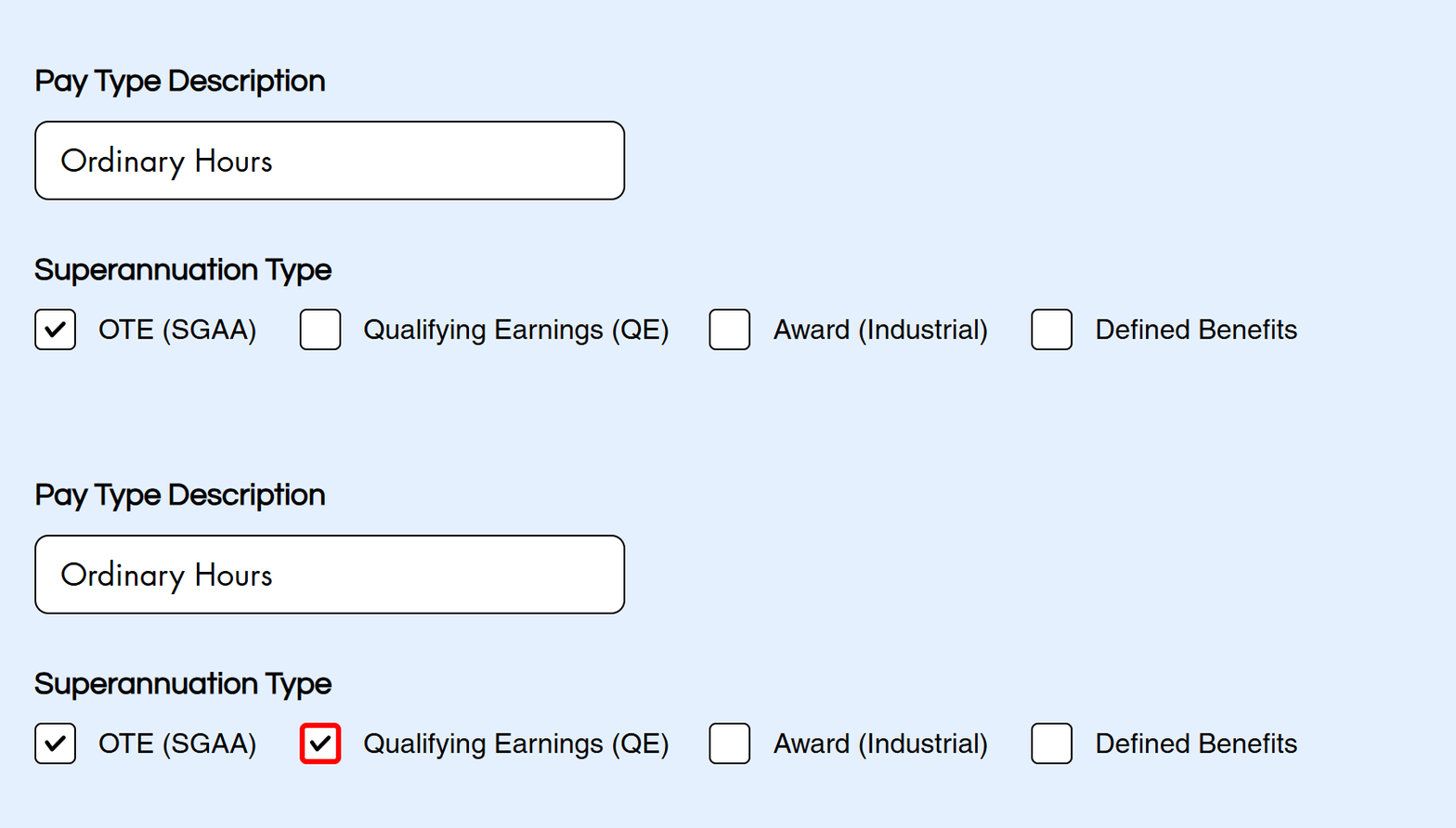
e-PayDay Go® will automatically configure the template pay types and notify the user when user-defined pay types need manual updates. This automated process will help ensure the employer's obligations are met.
How is the Super Guarantee (SG) amount calculated with Payday Super?
Superannuation Guarantee (SG) is calculated based on Qualifying Earnings (QE). The QE amounts are reported as Year-To-Date (YTD) figures when lodging your Single Touch Payroll (STP) reports. The Australian Taxation Office (ATO) subtracts the previous period's YTD qualifying earnings from the current reported period's YTD qualifying earnings to determine the period QE amount that impacts the individual SG contribution for a specific pay day.
To calculate the minimum SG contribution for each pay day, the ATO multiplies the QE amount by the applicable SG rate (currently 12%) and compares the result with the amount reported by the Superannuation Funds. A pay day is the date on which an employer makes a QE payment to an employee, also known as the 'QE day'. The ATO uses the Pay/Update Date (PAYEVNT69) reported via STP to determine the QE day.
What Superannuation types are required to be reported within the Payday Super legislation?
With the introduction of Payday Super, the legislated QE amount (Q) and the Superannuation Liability (L) must be reported.
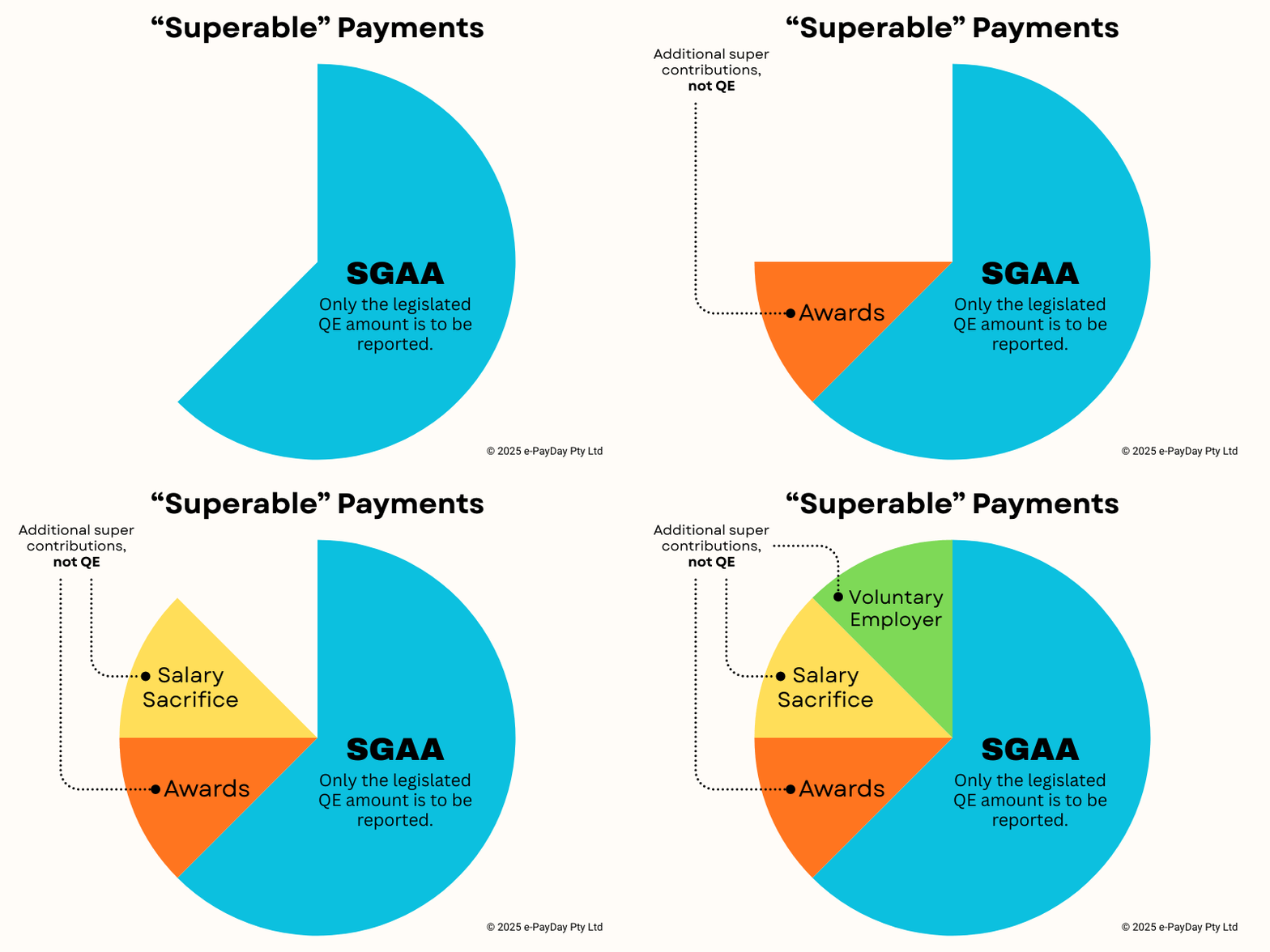
Specific additional contributions are reported separately in Single Touch Payroll (STP). The superannuation liability may consist of additional amounts if the payer has extra obligations under an Industrial Instrument (such as an Award or Agreement) to pay superannuation further to the requirements of the SGAA. 50 of the 122 Fair Work Modern Awards contain clauses that require an additional superannuation payment.

RESC (Reportable Employer Superannuation Contributions) are STP reported in e-PayDay Go® through Single Touch Payroll (STP), but not all software has this facility. The reporting of RESC is voluntary under STP, though if it is not reported using STP, it must be reported via Payment Summaries/Payment Summary Annual Reports (PSAR).
e-PayDay Go® reports all types of superannuation contributions using SuperStream. Some of the details are submitted to the ATO through STP. All superannuation contributions reported to the ATO are reconciled via the Member Account Transaction Service (MATS).
How can I effectively pay Payday Super and confidently meet all my Superannuation Contribution reporting obligations?
We have partnered with SuperChoice, Australia’s premier Clearing House service, trusted by the nation’s most prominent brands. With e-PayDay Go®, superannuation contribution reporting and payments are fast, accurate, and compliant. Employers must maintain the OTE/QE settings for each pay type to ensure accuracy and achieve the expected outcomes. Our payroll software is designed to provide a streamlined superannuation experience, whilst removing the complexity of managing your Super Guarantee (SG) and Payday Super obligations.
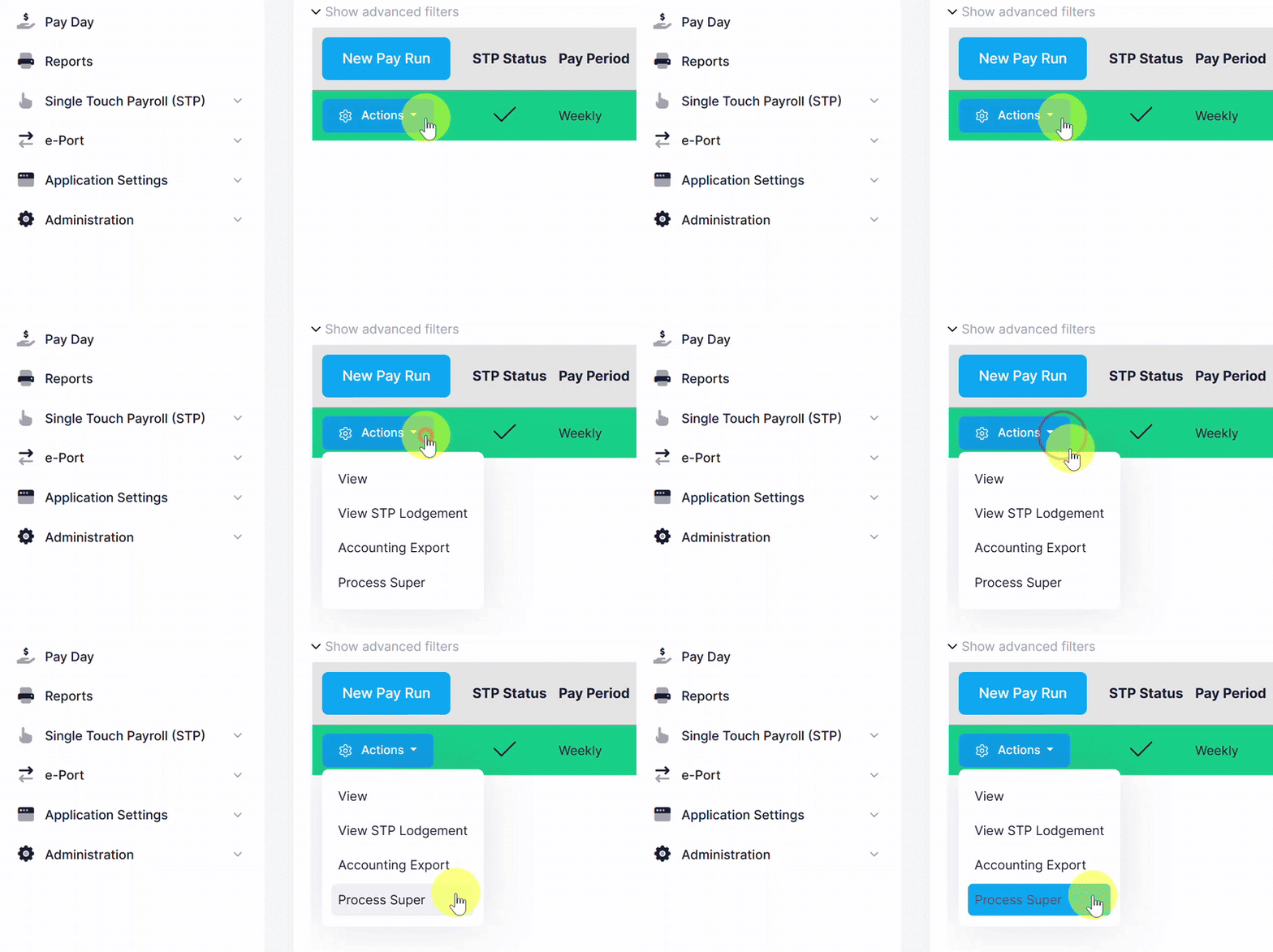
Processing and paying super on pay day is easy with e-PayDay Go® and is a seamless experience. Simply select Process Super when the pay run is completed, and the STP report has been lodged to report and pay your contributions.
How can I manage my cash flow effectively for Payday Superannuation?
We offer comprehensive support to help you navigate the distinctions between your employer and employee payment obligations, thereby ensuring adherence to superannuation reporting and payment requirements.
The table below categorises the different types of superannuation contributions, including compulsory employer contributions, salary sacrifice contributions, and personal contributions made by employees. It also outlines the specific reporting obligations for employers associated with each type.

Our approach enables you to distribute contribution payments, so you can meet your obligations without paying both contribution types (employer and employee) in one lump sum. This flexibility enables financial stability while ensuring compliance with relevant superannuation laws and regulations. By understanding these distinctions and implementing an appropriate payment strategy, you can effectively manage your superannuation responsibilities.
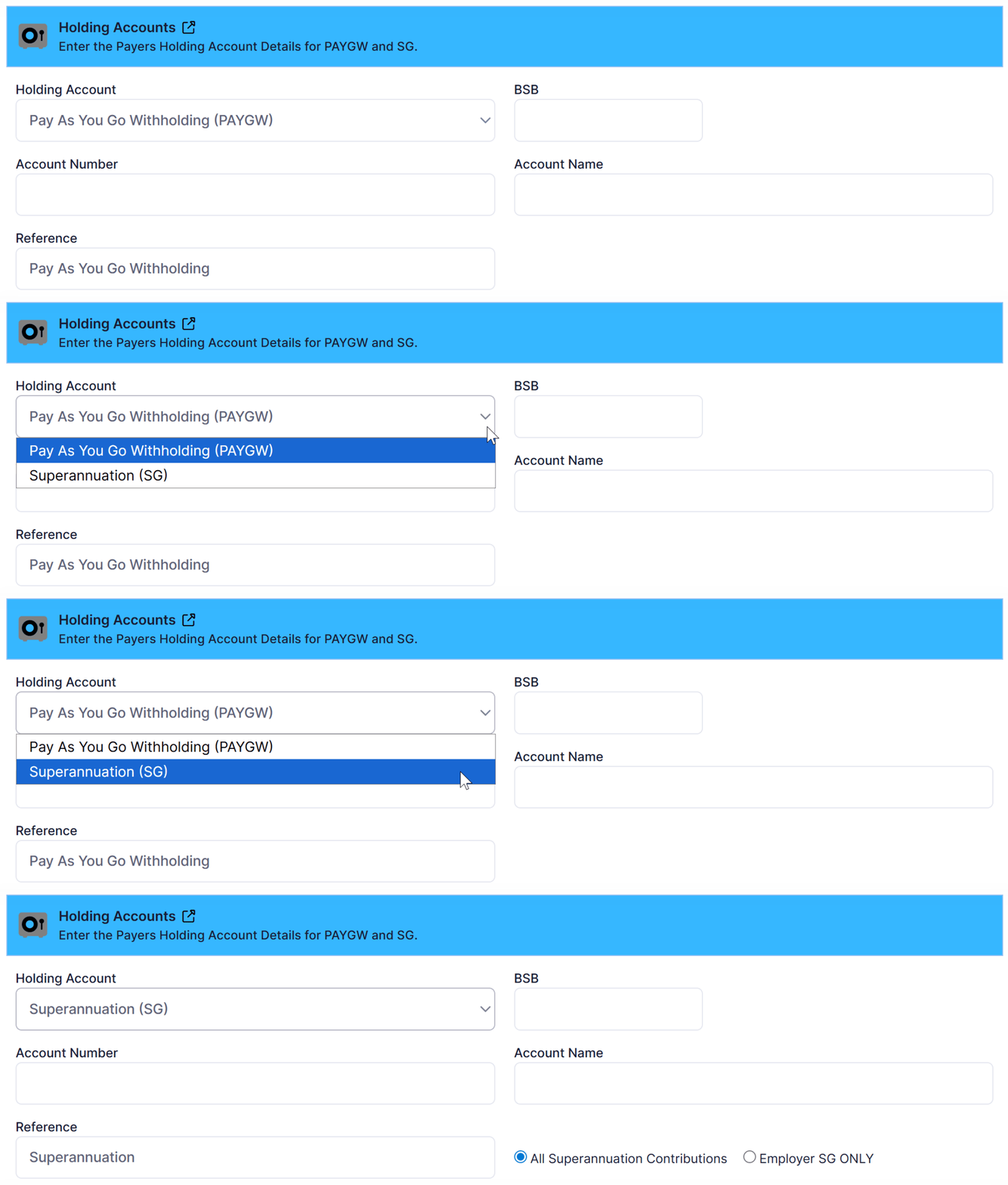
When processing the pay run, the superannuation (and PAYGW) liabilities can be automatically transferred to holding accounts with your financial institution, ensuring you can meet your obligations.
To assist in ensuring you have the funds available to meet your liabilities, you can easily set up two holding accounts with your financial institution. When you process your pay run in e-PayDay Go®, the total amounts of Superannuation and PAYGW are automatically transferred to the holding accounts as part of your banking file. This functionality has always been available in e-PayDay payroll products.
How do I confirm my superannuation contributions have been successfully processed?

e-PayDay Go® delivers a comprehensive suite of tools designed to assist you in confirming that you have successfully fulfilled your Superannuation Contribution obligations. In addition to these essential resources, we offer the innovative Payday Super Status Widget on your payroll dashboard. This widget provides a user-friendly, visual representation of the status of your most recent contribution processing, allowing you to easily track and manage your contributions at a glance.
What is Single Touch ePayDay Super®?
Single Touch ePayDay Super® is a suite of integrated features within e-PayDay Go® designed to help Australian employers manage superannuation payments, validation, reporting, and compliance with ease.
Built to support evolving government requirements — including the transition to Payday Super — Single Touch ePayDay Super® provides businesses with the tools needed to process, validate, and manage super contributions accurately while meeting regulatory obligations.
By automating key superannuation processes and integrating them directly within the payroll workflow, e-PayDay Go® helps employers simplify super administration and reduce compliance risk.
Key capabilities include:
-
Superannuation validation tools to help verify employee fund details and contribution data before payments are processed
-
Integrated super reporting and payment workflows within payroll
-
Tools to reduce the risk of late, incorrect, or rejected super contributions
-
Support for meeting Superannuation Guarantee (SG) obligations
-
Reduced exposure to penalties such as the Superannuation Guarantee Charge (SGC)
Single Touch ePayDay Super® provides employers with greater visibility, validation, and control over their superannuation obligations, helping ensure contributions are accurate, compliant, and processed efficiently.
What is the best way for my employees to easily and conveniently monitor their superannuation contributions at any time?

Employees will receive notifications via ClockMeIn® once their superannuation contributions have been processed. They can check YTD balances and access every pay slip processed using e-PayDay Go®.
Offers features providing complete pay transparency for employees:
-
Pay Slip and Superannuation payment notifications
-
Easily check YTD balances
-
Access digital timesheets anytime
-
View and download payslips instantly
